Hi there!
Welcome to my first blog post! 🎉
For an introduction of myself, please visit the About page.
I want to use this blog as an opportunity to learn about different topics while writing about them. I think writing about something is a great way to learn and understand the topic better. It is also a great way of collecting examples for future reference. As clearly stated on the About page, I am a big fan of Rust. No surprise that I will write a lot about Rust and various topics around it.
Some of the topics which are in my mind right now are:
- Building LED stripe controller using a xiao board running embassy-rs as a task runtime
- Trying to build a web application using e.g. leptos-rs
- Encoding messages into a binary wire format. My goto encoding mechanism is protocol buffers. I also want to take a look at capnproto and compare these two
Besides that, I recently started a course to be a certified artificial intelligence consultant. Tools like GitHub Copilot and ChatGPT provide a huge performance boost and are of great help. I think it is important to understand the basics of AI and to keep up with the fast-growing field of AI. That's why I also want to write about different AI related topics.
How I set up this blog
During my research on how to quickly set up a blog and publish it to GitHub Pages, I first stumbled upon Jekyll. Jekyll is a static site generator. Using static site generators, the content is typically stored as Markdown files. These are then converted into HTML pages using a template engine and a provided theme, which dictates the layout and style. I quickly stumbled upon Hugo as a more modern alternative to Jekyll, and soon afterwards I found Zola. Zola is appealing to me because it comes as a single binary. Also, it is written in Rust (plus points for that) and it seems pretty popular overall, so I decided to give it a try.
I followed the getting started section on the Zola website and set up a new site. The guide is pretty straightforward, and the documentation in general is very good and easy to understand. Finding a theme was a bit overwhelming at first, but I decided to go with the tabi theme, which also includes a getting started guide and a very detailed documentation. Also, a list of sample websites is provided which includes links to the source code of the websites as well. Taking a look at some of them got me started very quickly.
What I like about Zola:
- It is pretty easy to configure via
config.toml- Support for custom taxonomies
- A search feature is built in and can be enabled via the configuration
- A RSS feed generator is built in and can be enabled via the configuration
- After starting the development server with
zola servethe site is automatically rebuilt when a file changes- Blog posts can be marked as drafts and are not included in the generated site
zola serve --draftsincludes drafts in the generated site
What I like about tabi:
- The look of the theme is very clean and modern
- You can easily add a copy button to code blocks and reference the source file
- You can use e-mail obfuscation
- Just add
email = <YOUR EMAIL AS BASE-64>to the[extra]section in theconfig.toml
- Just add
- It comes with light and dark mode out of the box
- There is built-in support for series of blog posts
Deployment to GitHub Pages
Zola provides a github action to deploy the site to GitHub Pages. I followed this deployment guide, which almost worked out of the box. Running the given workflow file failed, but I quickly found this issue. Changing the workflow file to use shalzz/zola-deploy-action@master fixed the issue. The fixed file looks like this:
# On every push this script is executed
on: push
name: Build and deploy GH Pages
jobs:
  build:
    runs-on: ubuntu-latest
    if: github.ref == 'refs/heads/main'
    steps:
      - name: checkout
        uses: actions/checkout@v4
      - name: build_and_deploy
        uses: shalzz/zola-deploy-action@master
        env:
          # Target branch
          PAGES_BRANCH: gh-pages
          TOKEN: ${{ secrets.GITHUB_TOKEN }}
The workflow file of the deployment guide was fixed via this pull request
Finally, as the deployment guide says, I needed to head over to the repository settings and change the following:
- The action permissions needed to be set to read and write
- The source branch for deployment of the pages needed to be
gh-pages
Now, when a new commit is pushed to the main branch, the github action builds and deploys the updated webpage. Finally it can be accessed via https://ckrenslehner.github.io/.
Using a custom domain
Verification
I also wanted to use a custom domain for my blog. Github provides a lot of documentation on how to set up a custom domain. It is stated here that it's recommended to verify your domain prior adding it to GitHub Pages. So I followed these instructions and added a TXT DNS entry in the control panel of my DNS provider.
Just use the copy buttons to get the correct values for the record hostname and record value.
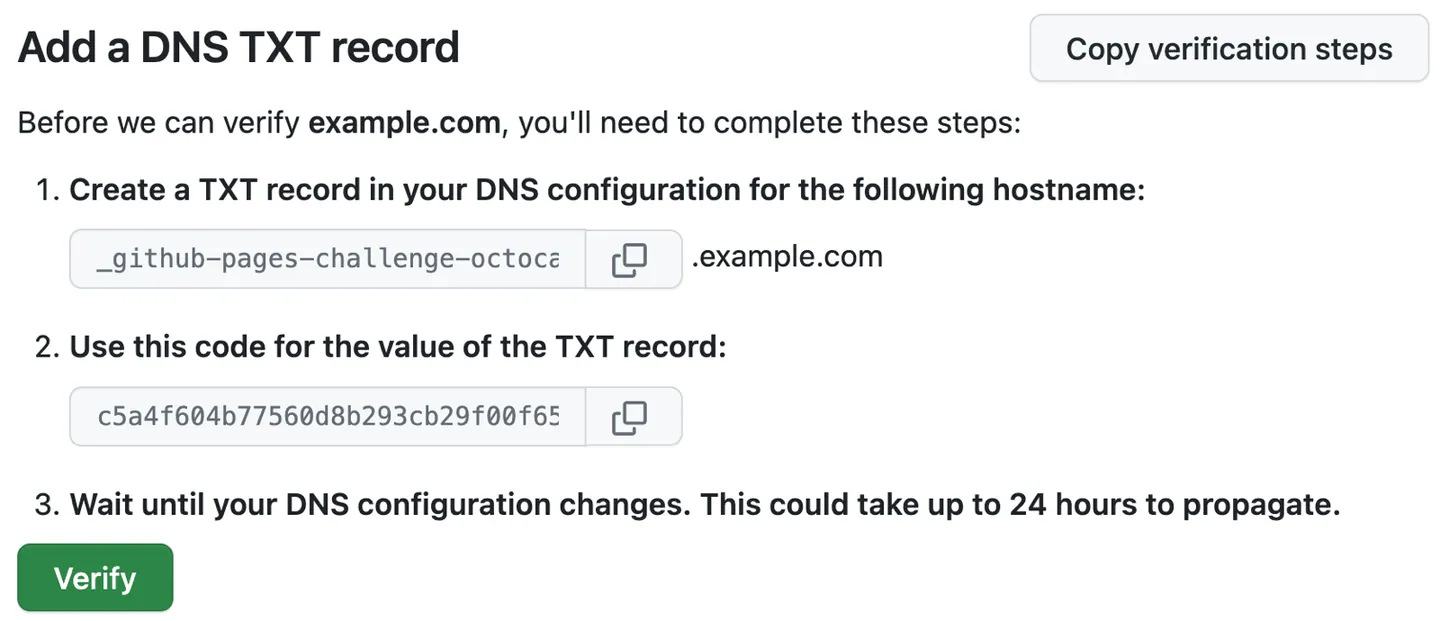 Source: Github

Connecting the domain to the repository
After my domain was verified, I followed this section of the documentation. I added the following entries at the DNS provider of my domain ckrenslehner.at:
| Host | Type | Destination |
|---|---|---|
| @ | A | 185.199.108.153 |
| @ | A | 185.199.109.153 |
| @ | A | 185.199.110.153 |
| @ | A | 185.199.111.153 |
| www | CNAME | ckrenslehner.github.io |
With this configuration ckrenslehner.at and www.ckrenslehner.at is routed to my github pages repository. To seal the deal, there needs to be a custom domain configuration in the github pages repository too. Github Pages requires a CNAME file to be in the root of the publishing branch (gh-pages in my case). As stated here, if there is a CNAME file in the static directory, it is copied by the zola github action automatically. So I added the following file:
ckrenslehner.at
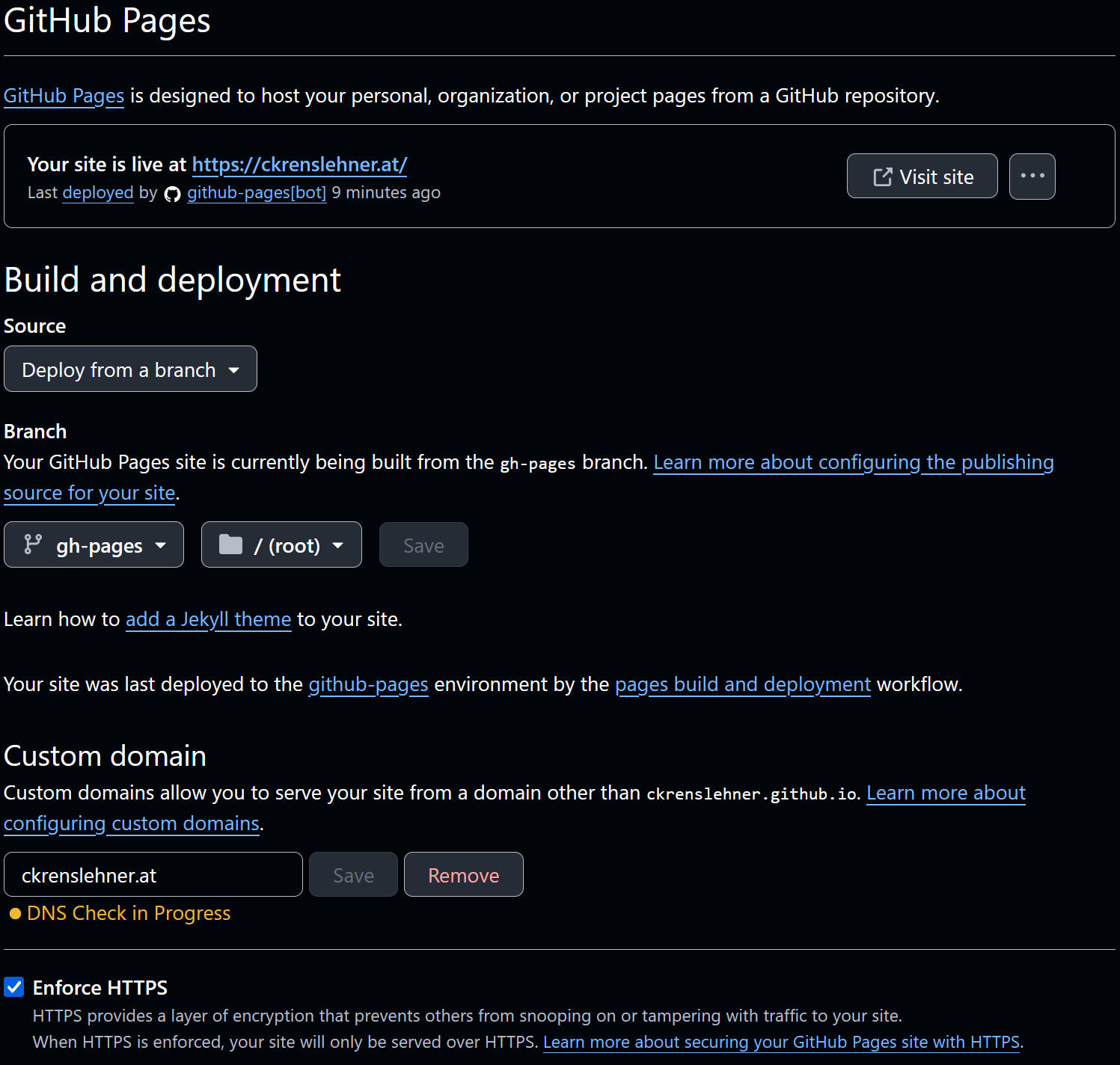
Finally, I enabled HTTPS in the pages settings of the repository. Here is a screenshot of my pages settings: